In today’s digital age, creating stunning videos has become essential for content creators, social media enthusiasts, and businesses alike. With over 60 million downloads across iOS and Android platforms, Videoleap has emerged as a game-changing video editing solution that’s transforming how we approach mobile video editing. Whether you’re a beginner looking to enhance your social media presence or a seasoned creator aiming for professional-quality content, this comprehensive guide will walk you through everything you need to know about downloading and mastering Videoleap.
Discover Videoleap: The Ultimate Video Editing App
What is Videoleap?
Videoleap is a powerful mobile video editing app that combines professional-grade features with an intuitive user interface. Created by Lightricks, the same company behind popular photo editing apps, Videoleap has earned a stellar 4.5-star rating in the App Store. What sets it apart is its ability to deliver desktop-level editing capabilities right on your mobile device. The app recently introduced auto-captions functionality, similar to CapCut, making it even more versatile for content creators who need to add text to their videos quickly.
Key Features and Benefits
The app shines with its comprehensive suite of editing tools and user-friendly interface. Here are the standout features that make Videoleap a top choice:
- Extensive Template Library: Access a vast collection of ready-to-use templates that streamline the editing process
- Cross-Device Compatibility: Works seamlessly on both iPhone and iPad, maintaining consistent performance
- AI-Powered Tools: Advanced artificial intelligence features for quick edits and creative transformations
- Regular Updates: Frequent app updates ensure you always have access to the latest features and improvements
- Auto-Captions: While not as robust as CapCut’s offering, the auto-caption feature provides efficient text overlay options
- Bundle Options: Available as part of the LightTricks app bundle, offering great value when combined with PhotoLeap and other content creation tools
The platform’s intuitive timeline editing, coupled with professional-grade effects and transitions, makes it suitable for both beginners and advanced users. Whether you’re creating content for social media, developing marketing materials, or editing personal videos, Videoleap provides the tools needed to bring your vision to life.
How to Download Videoleap: Step-by-Step Guide
Getting started with Videoleap is straightforward, whether you’re using an Android device, iPhone, or looking for alternative installation methods. Currently ranking #94 in the Video Players & Editors category on Google Play Store and #116 in Photo & Video on the App Store, this popular editing tool is readily available across platforms.
Downloading on Android Devices
- Open the Google Play Store on your Android device
- Tap the search bar and type “videoleap download” or “videoleap”
- Look for the official Videoleap app by Lightricks Ltd.
- Tap “Install” and accept the required permissions
- Wait for the download and installation to complete
- Once installed, open the app to begin editing
Remember to ensure you have a stable internet connection and sufficient storage space before initiating the download.
Downloading on iOS Devices
- Launch the App Store on your iPhone or iPad
- Search for “Videoleap” in the search bar
- Locate the official app with the Lightricks Ltd. developer name
- Tap “Get” or the download icon (cloud symbol if previously downloaded)
- Authenticate with Face ID, Touch ID, or your Apple ID password
- Wait for the installation to complete
The iOS version often receives updates first, ensuring you get the latest features as soon as they’re released.
Installation and Compatibility
Understanding the system requirements before downloading Videoleap ensures a smooth editing experience across different devices. Whether you’re looking for videoleap for android, considering videoleap android compatibility, or wondering about videoleap for mac options, here’s everything you need to know.
System Requirements for Android
To run Videoleap smoothly on Android devices, ensure your device meets these specifications:
- Android OS version 8.0 (Oreo) or higher
- Minimum 3GB RAM
- At least 200MB free storage space
- ARM64 processor architecture
- OpenGL ES 3.0 support
- Active internet connection for initial setup and updates
For optimal performance, I recommend using devices with 4GB RAM or more, especially when working with high-resolution videos.
System Requirements for iOS
iOS users need to meet the following requirements:
- iOS 13.0 or later
- Compatible with iPhone, iPad, and iPod touch
- Minimum 2GB free storage space
- 64-bit processor (iPhone 6s and newer)
- Internet connection for downloads and updates
- iCloud account for backup features
The app is optimized for newer iOS devices and performs exceptionally well on iPhone 11 and later models.
Supported Languages and Regions
Videoleap offers broad accessibility across different regions and languages:
Supported Languages:
- English (US and UK)
- Spanish
- French
- German
- Italian
- Portuguese
- Russian
- Japanese
- Korean
- Chinese (Simplified and Traditional)
- Arabic
Regional Availability:
- Available in over 150 countries
- Full feature access in most regions
- Some features may vary by location due to local regulations
- Payment options adapt to regional preferences
- Customer support available in major languages
Note: While videoleap for mac isn’t directly available, iOS users can access the app through iPhone and iPad. The company regularly updates language support and regional availability to serve its growing global user base.
Getting Started with Videoleap
Learning how to use videoleap might seem daunting at first, but with the right guidance, you’ll be creating professional-looking videos in no time.
Navigating the User Interface
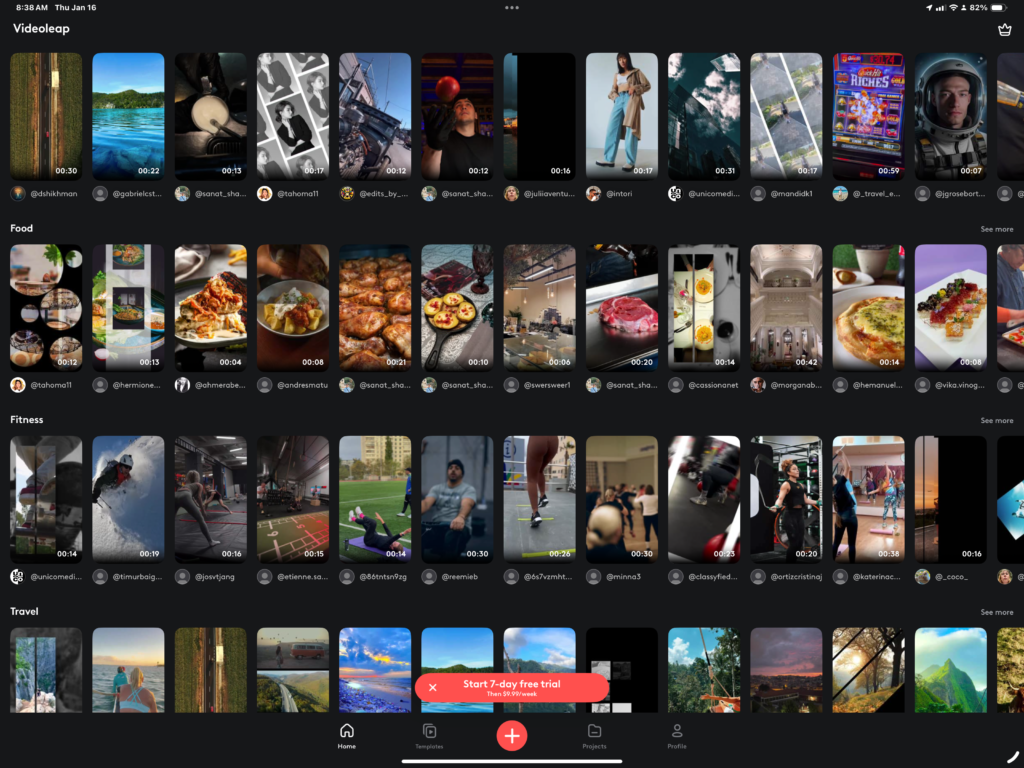
The Videoleap interface is thoughtfully designed for intuitive navigation. Here’s what you’ll find:
- Project Dashboard: Access your recent projects and start new ones
- Media Library: Import and organize your video clips, images, and audio files
- Timeline Panel: View and arrange your video segments chronologically
- Tools Panel: Quick access to editing features and effects
- Preview Window: Real-time preview of your edits
For beginners, videoleap tutorials are readily available within the app through the help center icon, making it easy to learn while doing.
Basic Editing Tools and Techniques
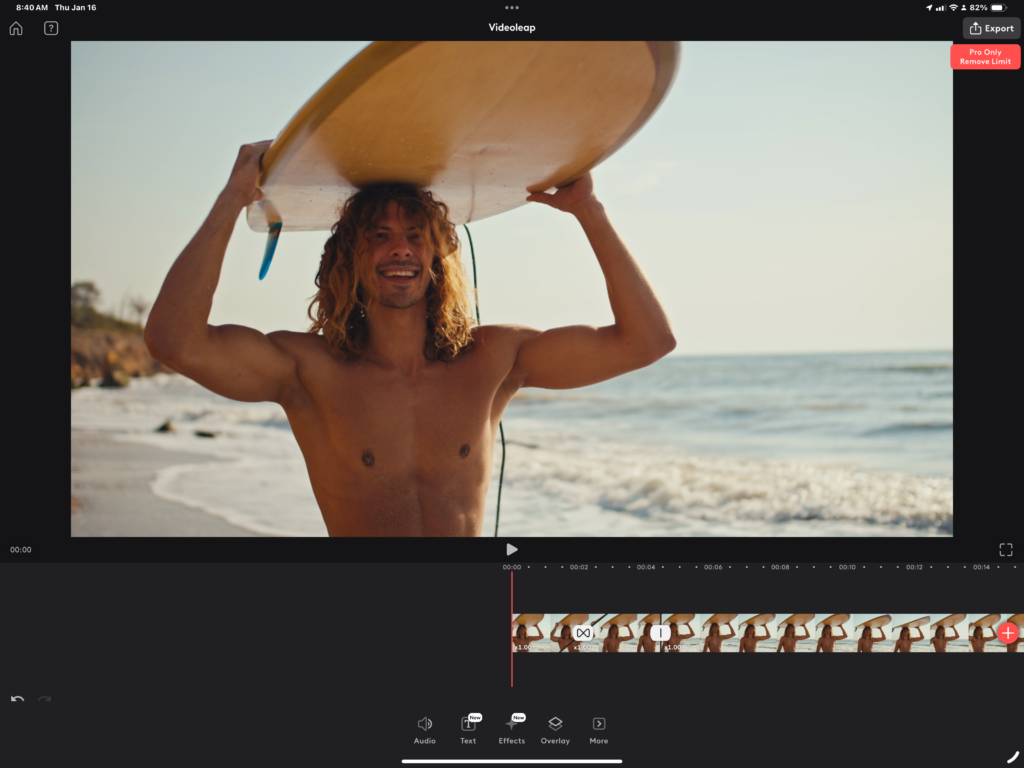
Master these fundamental editing tools to create engaging content:
- Video Manipulation:
- Trim and split clips
- Adjust speed and reverse footage
- Apply basic transitions
- Rotate and crop videos
- Audio Enhancement:
- Add background music
- Adjust volume levels
- Apply audio effects
- Voice-over recording
- Text and Graphics:
- Add animated text
- Insert stickers and emojis
- Create custom overlays
- Apply filters and color adjustments
Using Advanced Features like AI Tools and Effects
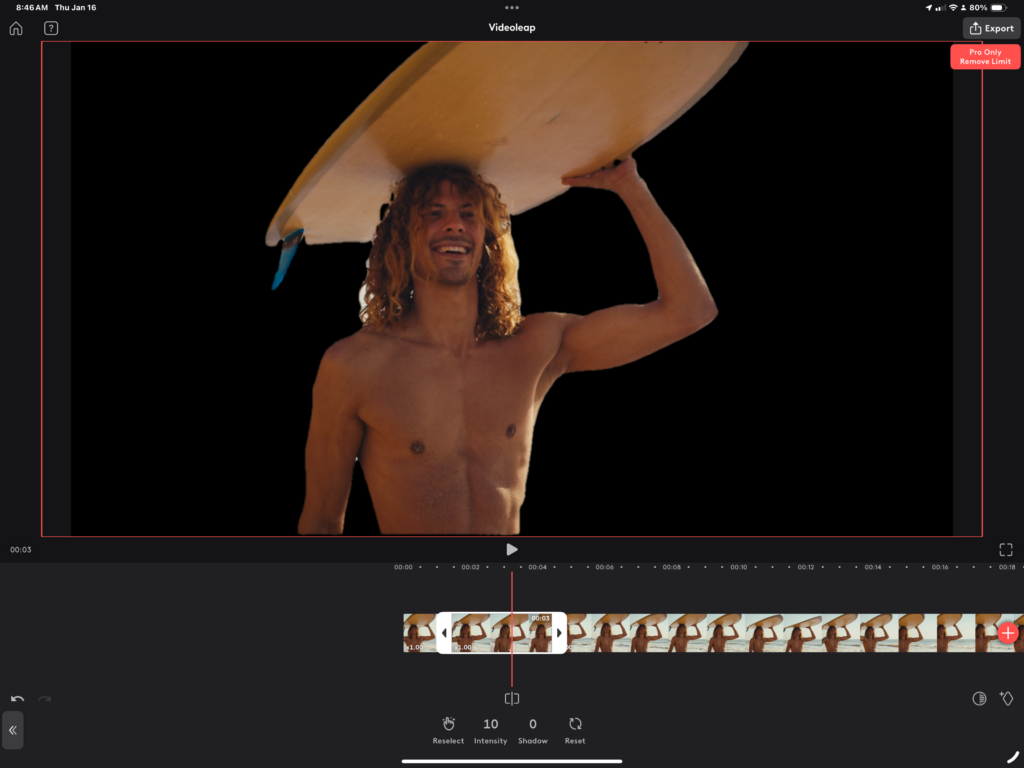
Videoleap’s sophisticated features set it apart from basic editing apps:
AI-Powered Tools:
- Smart object removal
- Automatic scene detection
- Background replacement
- Face filters and effects
Professional Effects:
- Green screen compositing
- Motion tracking
- Layer blending modes
- Custom animations
Creative Enhancements:
- Chroma key effects
- 3D transitions
- Particle effects
- Professional color grading
Whether you’re following videoleap tutorials or experimenting on your own, these tools enable you to create professional-quality content that stands out on social media platforms.
Tips and Tricks for Enhancing Your Videos
As videoleap: ai video editor continues to evolve, mastering its features can significantly improve your content quality. Let me share some expert tips to help you create stunning videos that capture your audience’s attention and stand out on social media.
Creating Engaging Social Media Content
Transform your raw footage into scroll-stopping content with these strategies:
- Platform-Specific Optimization:
- Vertical formats for Stories and Reels
- Square layouts for Instagram feeds
- Landscape orientation for YouTube
- Custom aspect ratios for TikTok
- Engagement Boosters:
- Hook viewers in the first 3 seconds
- Add captions for silent viewing
- Use trending music and sound effects
- Incorporate pattern interrupts to maintain interest
Utilizing Templates for Quick Edits
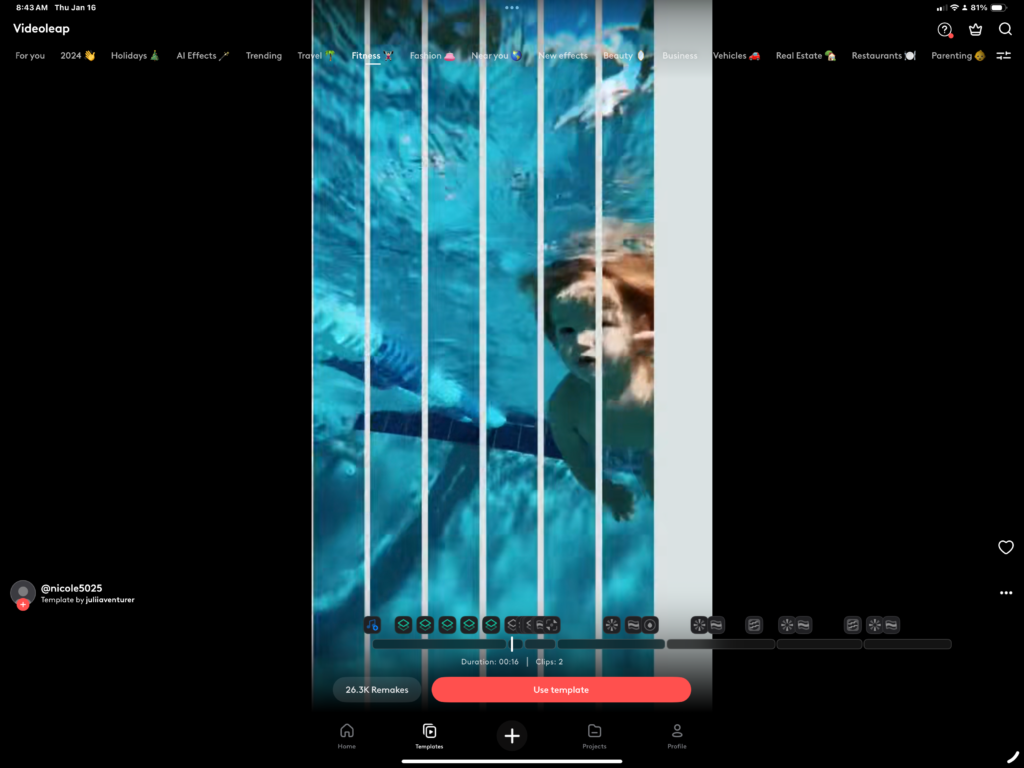
Videoleap ai templates streamline your editing workflow:
- Ready-to-Use Designs:
- Social media story templates
- Professional intro sequences
- Transition packs
- Brand-specific layouts
- Time-Saving Features:
- Pre-made color schemes
- Animated text styles
- Custom overlay patterns
- Quick export presets
Exploring AI Video Effects for Creative Transformation
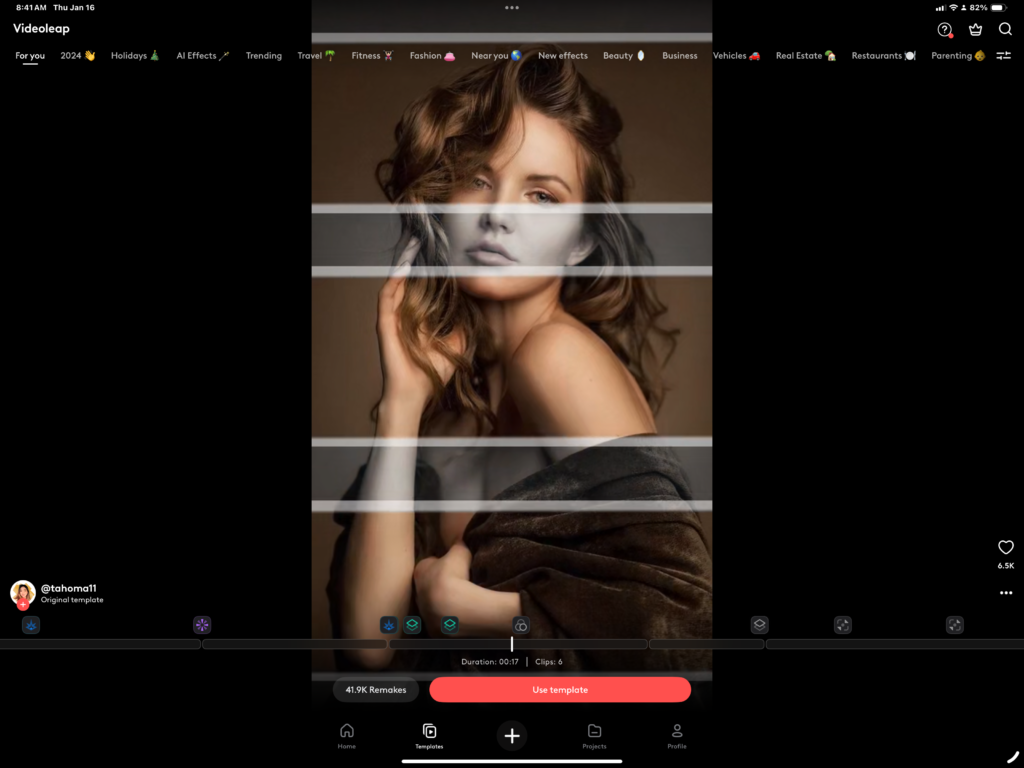
The videoleap: ai capabilities offer innovative ways to enhance your videos:
Smart Effects:
- Background removal and replacement
- Object tracking and animation
- Automatic color correction
- Smart scene transitions
Creative AI Tools:
- Style transfer effects
- Dynamic face filters
- Motion synthesis
- Intelligent frame interpolation
Using videoleap ai video editor’s advanced features, you can:
- Apply real-time beauty filters
- Generate dynamic animations
- Create seamless transitions
- Enhance video quality automatically
Pro Tip: Experiment with combining different AI effects to create unique visual styles that set your content apart. The videoleap ai tools are designed to work together harmoniously, allowing for endless creative possibilities while maintaining professional quality.
Remember to save your favorite effect combinations as presets to maintain consistency across your content and speed up future editing sessions.
Comparing Videoleap with Other Video Editing Apps
Based on numerous videoleap reviews and market analysis, let’s explore how this editing app stacks up against competitors and examine its strengths and limitations. Recent videoleap review feedback has shown that while it excels in certain areas, understanding its alternatives can help you make an informed decision.
Top Alternatives to Videoleap
Here’s how Videoleap compares to popular competitors:
CapCut

- Stronger auto-caption features
- Free to use
- More advanced effects and tools overall
- Better for more experienced users
Adobe Premiere Rush
- Professional-grade tools
- Cross-platform compatibility
- Higher learning curve
- More expensive
InShot

- Simpler interface
- Basic editing features
- Limited advanced tools
- Lower price point
KineMaster
- Professional timeline editing
- Advanced audio features
- Higher system requirements
- Limited free version
Pros and Cons of Using Videoleap
Pros:
- User Experience
- Intuitive interface
- Quick learning curve
- Smooth performance
- Regular updates
- Features
- Advanced AI capabilities
- Professional-grade effects
- Extensive template library
- Cross-device sync
- Output Quality
- High-resolution exports
- Professional-looking results
- Multiple export formats
- Quick rendering times
Cons:
- Cost Considerations
- Premium features require subscription
- Some features locked behind paywall
- Higher price point than basic editors
- Less features than CapCut
- Technical Aspects
- Higher device requirements
- Occasional performance issues on older devices
- Limited offline capabilities
- Some features require stable internet
- Learning Curve
- Advanced features need practice
- Limited tutorial resources
- Complex layer management
- Some tools lack documentation
Based on collective videoleap reviews, the app offers a solid balance between professional features and user-friendly operation, making it particularly suitable for content creators who want to produce high-quality videos without the complexity of desktop editing software.
User Reviews and Feedback
Understanding real user experiences and common challenges can help you make the most of your Videoleap journey. Let’s dive into what actual users are saying and explore solutions to frequent issues, including insights from videoleap customer service interactions.
Real User Experiences
Positive Feedback:
- “The AI tools transformed my content creation process completely.”
- “Perfect for quick social media edits on the go.”
- “Professional results without the complexity of desktop software.”
- “Templates saved me hours of editing time.”
Mixed Reactions:
- Professional Users
- Love the advanced features
- Appreciate regular updates
- Value the export quality
- Miss some desktop-level tools
- Casual Users
- Enjoy the intuitive interface
- Find templates helpful
- Some consider pricing high
- Appreciate quick learning curve
Common Issues and Solutions
1. App Performance Issues
- Problem: App crashes during editing
- Solution:
- Clear app cache
- Ensure 20% free storage
- Update to latest version
- Restart device
2. Export Problems
- Problem: Failed exports
- Solution:
- Check internet connection
- Reduce project length
- Lower export quality temporarily
- Keep selecting the file you want to use for a few times and it should finish loading since it stops loading the file and says error
3. Feature Access Issues
- Problem: Premium features locked
- Solution:
- Verify subscription status
- Restore purchases
- Log out and back in
- Update payment method
Quick Troubleshooting Tips:
- Keep app updated
- Maintain stable internet
- Monitor device storage
- Document exact issues
- Contact support early
When facing persistent issues, videoleap customer service can be reached through:
- In-app support chat
- Email support system
- Help center documentation
- Community forums
Remember to provide detailed information about your device, OS version, and the specific problem when seeking assistance.
FAQs About Videoleap
Can you download Videoleap on PC?
While videoleap for pc isn’t officially available, you can use Android emulators like BlueStacks or NoxPlayer to run the app on your computer. However, for the best experience, I recommend using the app on mobile devices as intended.
Can you get Videoleap for free?
Yes, is videoleap free to start with? The app offers a basic version with essential features at no cost. However, for advanced features, you’ll need videoleap pro subscription. Some users seek out videoleap mod apk versions, but I strongly advise against this due to security risks and potential legal issues.
Is Videoleap better than CapCut?
Both apps excel in different areas:
- Videoleap: is more user friendly, but lacks more advanced editing than CapCut
- CapCut: Stronger in basic editing and social media features Choose based on your specific needs and skill level.
Can I use Videoleap on my Mac?
Like the PC version, there’s no native Mac version. Consider iOS alternatives or professional desktop editing software for Mac users.
What is the best iPhone app for video editing?
Videoleap consistently ranks among the top choices due to:
- Professional-grade features
- Intuitive interface
- Regular updates
- Strong community support
What’s the best iOS video editing app for beginners?
Videoleap offers an excellent starting point with:
- Built-in tutorials
- Template-based editing
- User-friendly interface
- Gradual learning curve
How I will get free video editing application?
Start with videoleap free trial to explore basic features. You can also:
- Download the basic version
- Use available free features
- Watch for promotional offers
- Compare free alternatives
What is the best free video editing app for iPhone 13?
Videoleap’s free version offers robust features for iPhone 13, including:
- Basic editing tools
- Essential effects
- Standard export options
- Core templates
What is the best movie making software for an iPhone?
Videoleap stands out for movie making with:
- Professional transitions
- Advanced color grading
- Multiple layer support
- High-quality exports
Videoleap export failed/app crashed (solution)
To resolve these issues:
- Clear app cache
- Update to latest version
- Free up device storage
- Restart the app
- Check internet connection
Videoleap import failed help
Common solutions include:
- Checking file format compatibility
- Ensuring sufficient storage
- Verifying file permissions
- Updating the app
Is “Enlight Videoleap” music royalty or copyright free?
Yes, but that might change after a few months therefore always try to get the actual license for long term projects.s
Is Videoleap Free to Use?
The app follows a freemium model:
- Basic features are free
- Premium features require subscription
- videoleap pro unlocks all features
- Special offers available periodically
Can I Use Videoleap Offline?
Some features work offline, but limitations include:
- No cloud storage access
- Limited template access
- No real-time effects
- Restricted sharing options
How to Access Customer Support
Support options include:
- In-app help center
- Email support
- Community forums
- FAQ section
- Social media channels
Remember to check app updates regularly and maintain sufficient device storage for optimal performance.
Conclusion: Why Choose Videoleap for Your Video Editing Needs
The videoleap editor by lightricks has established itself as a powerful contender in the mobile video editing space, offering a compelling blend of accessibility and professional-grade features. When considering how much is videoleap worth to your content creation workflow, it’s important to look at the bigger picture.
Here’s why Videoleap stands out as an excellent choice:
Professional-Grade Features
- Advanced AI-powered tools
- Extensive template library
- Professional effects and transitions
- Multi-layer editing capabilities
User-Friendly Experience
- Intuitive interface
- Quick learning curve
- Comprehensive tutorials
- Regular feature updates
Value Proposition
- Flexible pricing options
- Free version available
- Premium features worth the investment
- Bundle options with other Lightricks apps
Whether you’re a social media content creator, aspiring filmmaker, or business owner looking to enhance your video content, the videoleap editor by lightricks offers the tools and capabilities to bring your vision to life. The combination of innovative features, user-friendly interface, and regular updates makes it a worthwhile investment for anyone serious about video editing.
Remember, while there are many editing apps available, Videoleap’s commitment to balancing professional capabilities with accessibility makes it a standout choice for creators at any skill level. As video content continues to dominate digital platforms, having a reliable and powerful editing tool like Videoleap in your creative arsenal can make all the difference in producing engaging, high-quality content that captures your audience’s attention.